
Ana içeriğe geç

Sürüm Notları

RSS beslemeleri aracılığıyla abone olarak yeni sürümlerden haberdar olun!

7.10.0 veya daha önceki sürüm notlarını arıyorsanız, lütfen App Store adresini kontrol edin.

Version 10.1.0

Supported Platforms: iOS | macOS | visionOS

uyarı
  • As of April 18, this version for macOS is not available yet because of a review delay. We are working on it and will release it as soon as it is approved. We will release the updated non-Safari browser extensions at the same time.
  • [iOS] Added new MDM settings for MDM platforms that don't support the Dictionary type in the managed app configuration. Now you can also specify rules using raw JSON string in the .redirectweb file you can export from the app. (Details: MDM Settings for Admins)
  • [iOS] Potential crash fix
  • Other minor bug fixes and performance improvements

Version 10.0.0

Supported Platforms: iOS | macOS | visionOS

uyarı
  • As of April 18, this version for macOS is not available yet because of a review delay. We are working on it and will release it as soon as it is approved. We will release the updated non-Safari browser extensions at the same time.

Introducing a new paid version

We launched a new app called RedirectWeb Pro, a separate paid version of RedirectWeb. It offers the same features as the fully unlocked version of RedirectWeb.

RedirectWeb Pro is especially suitable for users who want to purchase it in bulk (Volume Purchase) via Apple Business Manager or Apple School Manager. (Apple doesn't support Volume Purchase for in-app purchases, so we created a separate app.)
not
  • [macOS] For Chrome, Firefox, Edge, and other non-Safari browsers, please use version 10 or later of the same extension listed in the download links below. The extension will automatically recognize RedirectWeb Pro after you launch the app.
  • RedirectWeb Pro shares the same iCloud-managed rules as RedirectWeb, but not local data, including the ON/OFF status of rules.
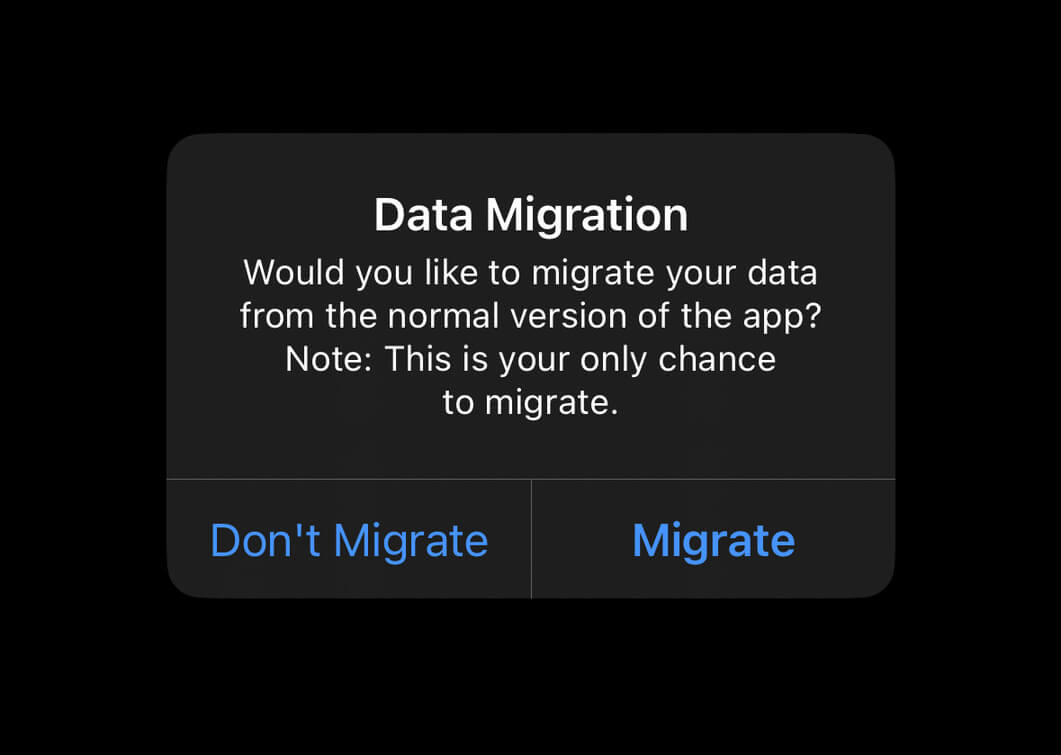
  • If you have previously used RedirectWeb, you will see a migration alert below the first time you launch RedirectWeb Pro. It's only shown for the first launch. Migration alert that asks to migrate data from RedirectWeb to RedirectWeb Pro.

Other Changes

  • Minor performance improvements and bug fixes.
  • Browser extension
    • Replaced the toolbar icon with the full-color app icon.
  • iOS, iPadOS, visionOS
    • Updated the video tutorial on the tutorial page.

Version 9.5.0

Supported Platforms: iOS | macOS | visionOS

This version is to roll out the changes introduced in 9.3.0 and 9.4.0 to macOS.

  • macOS App
    • ADDED Support for MDM settings. If you are an IT admin in your company or school, you can now distribute redirection rules to your employees/students via MDM! (Details: MDM Settings for Admins)
  • Browser Extension
    • ADDED You can now create a DNR rule that opens an app using deep linking. This is intended to be handled automatically, but if it doesn't work, please explicitly select Via Intermediate Page for the Main Frame Redirection option on the Edit Rule screen.


Version 9.4.0

Supported Platforms: iOS

This version is only for iOS, but the changes will eventually be rolled out to Mac as well.

  • iOS App
    • ADDED Support for MDM settings. If you are an IT admin in your company or school, you can now distribute redirection rules to users via MDM! (Details: MDM Settings for Admins)
  • Browser Extension
    • ADDED You can now create a DNR rule that opens an app using deep linking. This is intended to be handled automatically, but if it doesn't work, please explicitly select Via Intermediate Page for the Main Frame Redirection option on the Edit Rule screen.

Version 9.3.0

Supported Platforms: iOS

This version is only for iOS, but the changes will eventually be rolled out to Mac as well.

  • iOS App
    • ADDED Support for MDM settings. If you are an IT admin in your company or school, you can now distribute redirection rules to users via MDM! (Details: MDM Settings for Admins)
  • Browser Extension
    • ADDED You can now create a DNR rule that opens an app using deep linking. This is intended to be handled automatically, but if it doesn't work, please explicitly select Via Intermediate Page for the Main Frame Redirection option on the Edit Rule screen.

Version 9.2.0

Supported Platforms: iOS | macOS | visionOS

  • Browser Extension:
    • FIXED The connection between the background script and the content script could be lost in some cases, causing rules not to be applied correctly. This version includes a new reconnection mechanism to address this issue. (Details: #104)

Version 9.1.0

Supported Platforms: iOS | macOS | visionOS

  • Browser Extension:
    • FIXED Safari: A memory leak issue in the native messaging host that caused the extension to consume more memory over time when used with Safari. This issue did not occur in other browsers.
    • FIXED The focus ring of the Enable Rules button shown in the popup was not displayed correctly.
  • App (iOS):
    • FIXED My Rules: The background of buttons shown in rule selection mode was not drawn correctly.

Version 9.0.0

Supported Platforms: iOS | macOS | visionOS

Brand Renaming to RedirectWeb

We changed the brand name to RedirectWeb from Redirect Web. (No space between "Redirect" and "Web".)

The owner and the developer of RedirectWeb remain Manabu Nakazawa, as before.

Changed Support Website

We moved the support website to redirectweb.net from mshibanami.github.io/redirect-web. Now the old URL will redirect to the new one automatically.

Updated Terms & Privacy Policy

Since we changed the app’s brand name to RedirectWeb, we also updated our Terms of Use and Privacy Policy to reflect the renaming. Find the full diff here.

Other fixes and improvements

  • Fixed a crash when opening a privacy policy link in the Prepare Extension screen.

Version 8.10.1

Supported Platforms: macOS

  • Fixed an issue where the main window was too small when initially launched on macOS Tahoe. (#99)

Version 8.10.0

Supported Platforms: iOS | macOS | visionOS

  • [NEW] Pause Rules: You can now temporarily suspend rules for specific durations (#97):

    In addition, on iOS, now that this feature is available, the app and the extension popup also show the Enable Rules toggle.

    (To use this feature, please update both the app and the extension to the latest versions.)

  • Fixed an issue where confusing errors appeared in Safari’s extension settings window on Mac. (#96)

  • Improved reliability of in-app purchase processing.